Skein v1.1.31
Everything in the box
Skein has no plugin system. Every feature below is in the app when you download it, works offline, and writes plain Markdown to a folder you chose. Where a comparable Obsidian plugin exists it is named, with its install count, because that number is the honest measure of whether the feature was worth building.

47 features, press / to filter
Writing
Plain Markdown files in a folder you chose. Nothing is stored anywhere else, and nothing is stored in a format only Skein can read.

Markdown editor
Syntax hidden as you type, so a heading looks like a heading without the hash disappearing from the file.
Or show the marks
View > Show Markdown Syntax, Option-Command-E. The editor still renders, and leaves the asterisks and hashes where you typed them, for anyone who would rather see what is in the file. It used to be a checkbox in Settings with no menu item and no shortcut, which made a mode look like a broken renderer.
One Markdown engine
The editor, reading mode and the export are the same parse, and there is a test that proves it. Everywhere else in this category they are separate systems, which is why a note can look one way while you write it and another way when you read it back.
647 of CommonMark's 650 conformance examples, 666 of GitHub Flavored Markdown's 672. The full table, and every failure explained, is at /blog/the-markdown-score.
Slash commands
Type / at the start of a line for headings, lists, tasks, quotes, code blocks, tables, callouts, dates, query blocks, footnotes and definition lists. It finds things by what you call them, so filter or dataview finds a query block, and it shows the Markdown each one writes so you stop needing the menu.
Reading mode
The same note rendered: headings, tables, callouts, images and clickable links. One key to switch.
The typeface, and what it can do
The editor sets in the system sans or a proper serif, and Settings shows what that face is actually capable of: old-style figures, tabular figures, high legibility, a single-storey a. Only the ones the face you chose really has, so there is never a switch that does nothing. The air between the lines is Compact, Normal or Comfortable: named steps rather than a slider, because a slider produces a number nobody can name. No font field, and no CSS snippet to keep somewhere.
Themes, and a theme you make
Settings, General, Appearance - light and dark and the theme in one place. Default follows your Mac, Paper is warm, True White is the clean light one for people who do not want warm, and True Black is a deliberate OLED dark. Or make your own: seven named things - window, page, text, quiet text, dividers and two accents - with the contrast measured and shown as you change them, so you find out a theme is unreadable before you live in it. The second accent follows the first unless you unlink it. No gallery to browse and no stylesheet to drop in; you change the colours Skein has.
Tasks
A checkbox you can click, in the editor and in reading mode. Ticking one rewrites a single character in the file, so a vault kept in git shows a one-character diff rather than a reformatted line.
Code blocks with highlighting
Fourteen languages, in the editor, the reader and the export alike. A language Skein does not know gets plain monospace rather than a guess, because a half-supported language that mis-colours is worse than none.
List editing that behaves
Return continues a list and numbers count up. Insert an item in the middle and the ones below renumber. Tab and Shift-Tab nest and un-nest at the right depth for the parent's marker. A list you deliberately wrote as 1. 1. 1. is left exactly as typed.
Obsidian does not auto-renumber in the editor; the request has been open for years and is filled by a third-party plugin.
Footnotes and definition lists
Both in core, in all three surfaces. Definition lists use PHP Markdown Extra's syntax, so a file written in Pandoc or Zettlr reads the same here.
Obsidian has had the definition-list request open since 2020. Only Zettlr has them.
Format menu and shortcuts
Every block format in the menu bar with a keyboard shortcut, plus an optional formatting bar along the bottom of the editor. A feature you cannot find is a feature you do not have.
Focus and typewriter modes
Dim everything but the paragraph you are in, and keep the line you are writing in the middle of the window. Either, both, or neither.
Formatting bar
Appears when you select text and nowhere else: bold, italic, strikethrough, highlight, code, link, link to a note. The editor is bare again the moment you deselect.
Pictures
Drag one in, or paste one from the clipboard. It is copied into your vault, never linked to somewhere else on your disk. Sized to fit the column and never blown up past its own resolution.
Table editor
Tab to the next cell, Shift-Tab back, Return for a new row. Columns line themselves up as you type, and the file stays an ordinary pipe table.
Obsidian: Advanced Tables, 3.1M downloads.
Callouts
All thirteen types, with folding. Note, tip, warning, danger, question and the rest.
Obsidian: Admonition, 940k downloads, later absorbed into core.
Templates
Ordinary notes in a templates folder, with dates, the note's own title, a cursor position, and questions the template asks when you use it.
Obsidian: Templater, 4.7M downloads.
Where a new note lands
Where you are: the + button names the folder in its tooltip before you press it. Set an inbox if you would rather everything arrived in one place, and move a note from the keyboard instead of dragging it. The inbox is empty until you set it, because reversing the rule for everybody to suit one person is not a default.
Quick capture
Control-Option-Command-Space from any app. Type a line, press Return, it lands at the end of today's note. You are not taken anywhere. Remap it if you like: every one- and two-modifier Space combination belongs to Apple, and Skein says so when you pick one rather than letting you wonder why nothing happens.
Obsidian: QuickAdd, 1.9M downloads.
Connecting
The point of a knowledge manager is what sits between the notes, not the notes themselves.

Canvas
An infinite board. Cards, notes from your vault, pictures, links and groups, joined by labelled arrows. Saved as JSON Canvas, the same open format Obsidian writes.
The same file opens in either app.
Shapes
A card can be a rectangle, a pill, an ellipse, a diamond or a cylinder, picked from the card's own toolbar. Named for what they are rather than what they should mean, so a diamond can be a decision or a question or whatever you always draw as a diamond. Arrows meet the outline rather than floating beside it, and a card you reshape grows around its centre instead of clipping what you wrote.
Stored in the key Obsidian's canvas plugins already use: right there with the plugin, a plain rectangle without it, and a board you never reshape is byte-for-byte untouched.
Read a note beside the board
Clicking a card opens its note in the second pane with the canvas still in the first, so the arrangement you made to think with does not vanish the moment you use it.
Wikilinks and backlinks
Type [[ and complete. Every note knows what points at it, and renaming a note fixes every link to it.
Block references
Right-click a block and copy a link to it, or write ^the-cost at the end of a line yourself. Link to that exact line from anywhere with [[Note#^the-cost]], or pull the line itself into another note with an exclamation mark. The name comes from the words in the block rather than from a random number, so it still means something a year later; it has to be unique, and Skein tells you where the clash is.
Obsidian generates six random characters. Here the name is yours.
PDFs in a note
Write ![[paper.pdf]] and read it where you are. Select text to highlight it, jump to a page with #page=3, and your marks live in a small readable file beside the PDF - the PDF itself is never rewritten. Export a copy with the marks burned in when you need to send one.
Files outside the vault
An ordinary Markdown link to a file elsewhere on your Mac works: Skein asks once for the folder and remembers. Folders reached through an alias or a symlink appear in the sidebar too, so a vault does not have to be one self-contained folder.
Local graph
The neighbourhood around the note you are reading, not a hairball of the whole vault. Parents, siblings and children inferred from folders, links and headings.
Tags
Inline or in frontmatter, renameable across the whole vault in one action.
Obsidian: Tag Wrangler, 990k downloads.
Finding
A vault you cannot search is a folder.
Live queries
A fenced block that asks a question of your vault and renders the answer as a list, table, board or calendar. Filter by folder, tag, property or date; sort and limit. Put a summary line under a table for a sum, an average, a count or a high and low - and edit a property straight in the table, without opening the note.
Obsidian: Dataview, Tasks, Kanban and Calendar - 13.9M downloads between them.
One search
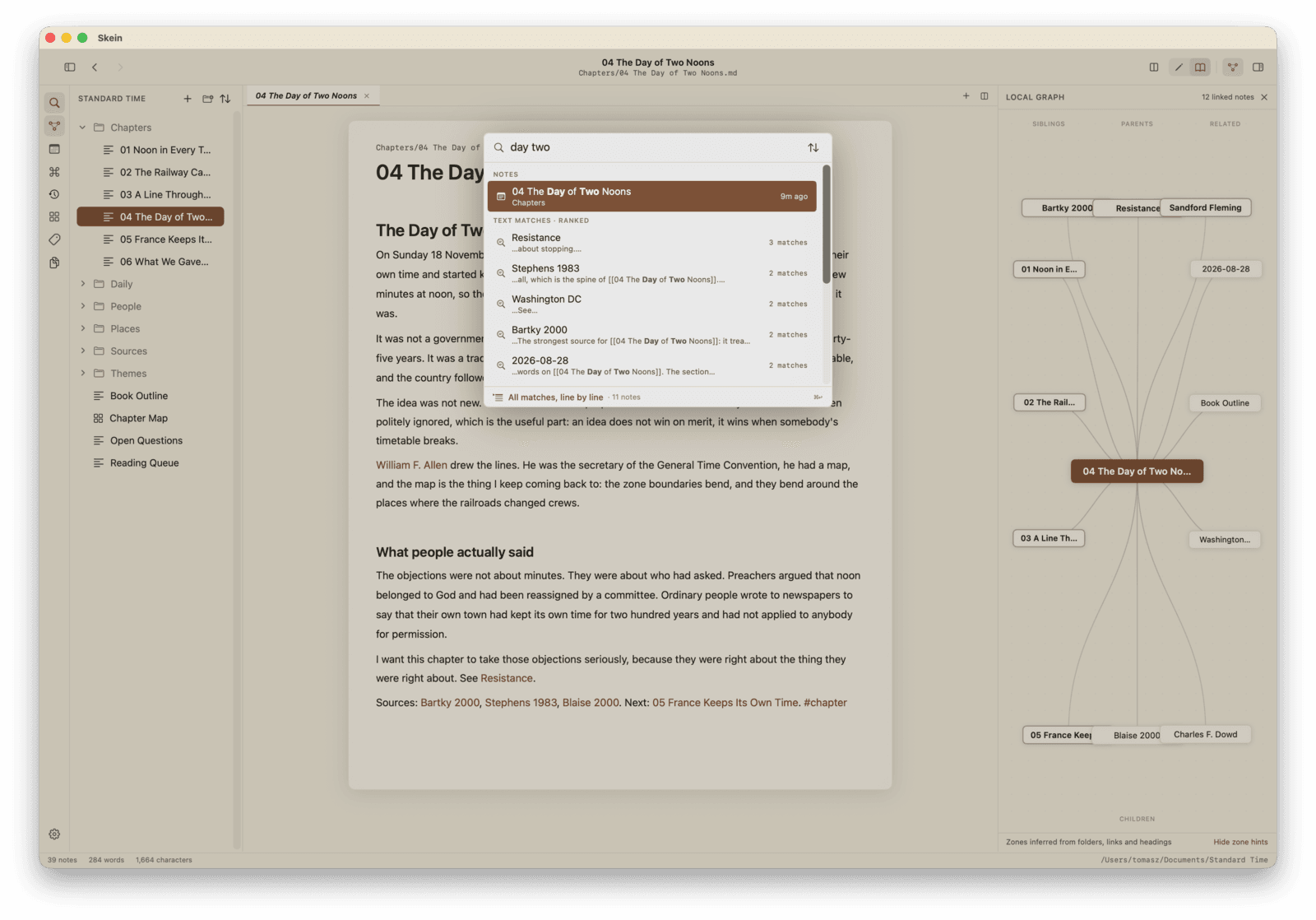
Command-O (or Control-F): titles appear as you type, ranked full-text matches beneath them with your words in bold, and opening a result lands on the match itself, highlighted. Quoted phrases, -exclusion, OR, tag: and path: filters all work in the same box.
All matches, line by line
Command-Return expands any search into every occurrence, grouped per note with a line of context each, ranked by relevance rather than the alphabet. Click a line and the caret lands on that exact occurrence.
Find in note
Command-F, the native find bar, in editing and reading modes alike.
Command palette
Command-P for everything else.
Properties
YAML frontmatter as a form: checkboxes toggle, a date and a timestamp each get a picker, and typing a key offers the values the rest of your vault already uses, so a status stays one word instead of becoming three spellings of it. Every query you write reads them back. The rest of the block is left exactly as you wrote it, comments and all, and a nested mapping is shown read-only rather than as a field that would flatten it - the raw YAML is one button away when you want it.
Obsidian rewrites the whole block through a JavaScript object on every property edit, which is documented and deliberate: comments go, quotes go, 123.0 becomes 123. It does that so plugins can read frontmatter easily. Skein has no plugins, so it pays none of it.
Daily notes
One note per day, and the journal is a sequence you can walk: Command-Option-Left and Right step through the days you actually wrote something, and Command-Option-D jumps to a date.
Spotlight
Your notes are indexed by macOS, so they turn up in system search too.
Shortcuts
Search the vault, create a note, open one, append to today's - all four in the Shortcuts gallery, with nothing to install. A search hands back the notes themselves rather than a list of names, so a shortcut can take the first result and read it, open it or pass it on.
Obsidian reaches Shortcuts through a community plugin and URL schemes.
Getting around by keyboard
Command-Return opens the link under the cursor. Option-Command-Up and Down walk the notes this one links to and the notes that link to it. Back and forward belong to each pane rather than to the window, so going back in a split moves the side you are reading.
Keeping
Your notes should outlive the app that made them, including this one.
Version history
Every save snapshotted, with a diff and one-click restore, holding exactly what was on disk rather than a tidied copy of it. Stored outside your vault so it never clutters the folder.
Renamed somewhere else
Rename or move a note in the Finder, or let a sync client do it, and Skein follows the file rather than seeing one note vanish and a stranger arrive. Its history, its canvas cards, its tab and your place in it all come with it. It offers to update the links instead of rewriting twenty notes you never opened.
Export
A single self-contained HTML file, a PDF, or the Markdown itself. No Skein-specific syntax survives an export, because there is none.
Import from Notion
Point it at an unzipped export. Ids stripped from filenames, internal links rewritten as wikilinks, databases turned into tables, page properties turned into frontmatter.
Obsidian: Importer, 1.45M downloads.
Import from Ulysses, Bear, Craft and iA Writer
File > Import Markdown Folder. It converts each app's own syntax - inline footnotes, annotations, highlights - and leaves ordinary Markdown alone, including anything inside a code block. It never deletes and never overwrites, and it tells you what it changed.
Quick Look
Press space on a note in the Finder and read it rendered, not as raw text. The preview is handed the file and nothing around it, so a picture stored beside a note shows as its description rather than the picture - that is the sandbox, not a fault.
Open it somewhere else
Pick the editor a note opens in from the sidebar or with a shortcut. Wanting Skein to own .md in the Finder and wanting a code editor for the occasional raw edit are not in conflict, so choosing an app here does not cost you the other.
Your files, always
Ordinary .md files. Open them in TextEdit, edit them in another app while Skein is running, keep them in git. Skein notices and reloads.
All of it, in one download.
14.2 MB· macOS 14+ · No account, no subscription
Get Skein on the App StoreOr download the .dmg directly (18.0 MB, for Macs without the App Store)
The help page explains how to use all of it, and this post argues for why it is built this way.
Comparisons with Obsidian, Bear, Craft and Logseq, each naming what the other one does better.